


Enable
AdSense on your blog
You can
make money with your blog by enabling AdSense. AdSense is Google's
content-targeted advertising program. If you use AdSense, relevant ads will
automatically be shown based on what your posts are about. For example, if you
blog about baseball, you might see ads for “Major League Baseball memorabilia”
next to your post. If you blog about painting, you might see ads for “Art
Supplies.”
Enable
AdSense for your blog
Click on
the Earnings tab from the drop-down menu on your dashboard.

You’ll then
see the AdSense overview page. If you haven’t signed up for AdSense yet, click
Sign up for AdSense.

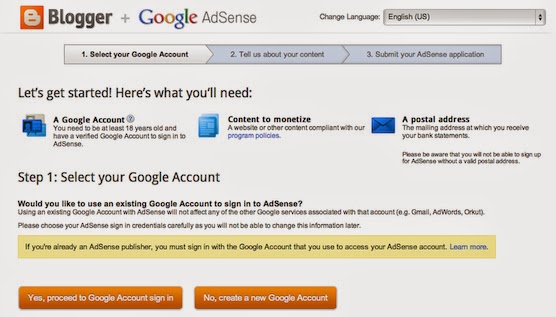
Select whether you'd
like AdSense on the Google Account you're currently signed in to, or if you'd
like to create a new Google Account.

Complete
the application form, review the information you've provided, and then agree to
terms and conditions.Ads will not appear on your blog until your application
has been approved. Once you receive confirmation that your application was
approved, you can control the ways the ads show up on your blog through the
settings on the Earnings tab at anytime. It’s up to you whether or not to show
ads, and where on your blog to display those ads (sidebar and posts, just
sidebar, or just posts) if you’re using Traditional templates. Dynamic Views
users can skip this step, as we’ve already optimized ad placement for Dynamic
Views templates.


0 comments:
Post a Comment