


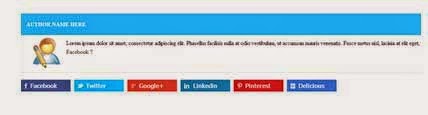
Edit html and Find Out
<div class='post-footer-line post-footer-line-1'>
Note :- After the Finding the Above code,copy the below code and paste it below the above code
<div
class="beh-entry-author">
<div
class="author-header main-color-bg">
<h4
class="title">
<a
rel="author" href="#">Admin
Name Here</a>
</h4>
</div>
<div
class="author-wrap">
<div
class="author-avatar">
<img class="avatar
avatar-80 photo" width="80" height="80" src="Your
Image Link Here"/></div>
<div
class="author-description">
Author Bio Here Write
something about yourself.
<div
class="author-link">
<a
rel="author" href="#">
Facebook
<span
class="meta-nav">?</span>
</a>
</div>
</div>
</div>
</div>
<div
class="entry-social">
<div
class="fb">
<a
target="_blank" href="Your_Facebok_Page">Facebook</a>
</div>
<div
class="twitter">
<a
target="_blank" href="Your_twitter_Profile">Twitter</a>
</div>
<div
class="gplus">
<a
target="_blank" href="Your_Googleplus_Follow">Google+</a>
</div>
<div
class="linkedin">
<a
target="_blank" href="Your_Linkedin_Profile">Linkedin</a>
</div>
<div
class="pinterest">
<a
target="_blank" href="You_Pinterest_Page">Pinterest</a>
</div>
<div
class="delicious">
<a
target="_blank" href="Your_Delicious_Profile">Delicious</a>
</div>
<p style="
line-height:0px; font-size:7px; font-weight:bold;
text-align:right"><a style="color:#D3D3D3;"
href="http://www.bloggingehow.com">blogger
widgets</a></p>
</div>
<style>
.entry-social {
margin-bottom: 20px;
overflow: hidden;
}
.entry-social a {
color: #FFFFFF !important;
display: block;
font-family: "Open
Sans","Tahoma","Verdana","Arial",sans-serif;
font-weight: 600;
padding-left: 20px;
}
.entry-social div {
float: left;
margin-right: 10px;
width: 138px;
}
.entry-social .fb a {
background:
url("https://blogger.googleusercontent.com/img/b/R29vZ2xl/AVvXsEiM6yfEE48jnUb7IeMSGGF7fmvF90GbS3xkLiyXGyasrhc1ek3fyL01lbWwE3_3cACayLw92ICo_a3KSQ0AkjOS5_Vy_wGSAPSrEv41t4EkBDPdKg2SI6xMOpR14n6484TYfuiCvhlcZzCC/s1600/fb14.png")
no-repeat scroll 10px center #3B5999;
padding: 7px 10px 7px 26px;
}
.entry-social .fb a:hover
{
background:
url("https://blogger.googleusercontent.com/img/b/R29vZ2xl/AVvXsEiM6yfEE48jnUb7IeMSGGF7fmvF90GbS3xkLiyXGyasrhc1ek3fyL01lbWwE3_3cACayLw92ICo_a3KSQ0AkjOS5_Vy_wGSAPSrEv41t4EkBDPdKg2SI6xMOpR14n6484TYfuiCvhlcZzCC/s1600/fb14.png")
no-repeat scroll 10px center #324B81;
}
.entry-social .twitter a {
background:
url("https://blogger.googleusercontent.com/img/b/R29vZ2xl/AVvXsEhQcIcknms59Z9Ts-rqhm6EmoVYF0Lg78IUST-xpplOdL7olcGMNG4HcwmRbpJXpXPOEJBUEX1FsFOLFH6oatVbeZTh4abc3S3P0S7wkxP7_JesfJw3dQEQn7G5-VRnJvDGXu-snT_C71qd/s1600/twitter14.png")
no-repeat scroll 8px center #01BBF6;
padding: 7px 10px 7px 32px;
}
.entry-social .twitter
a:hover {
background:
url("https://blogger.googleusercontent.com/img/b/R29vZ2xl/AVvXsEhQcIcknms59Z9Ts-rqhm6EmoVYF0Lg78IUST-xpplOdL7olcGMNG4HcwmRbpJXpXPOEJBUEX1FsFOLFH6oatVbeZTh4abc3S3P0S7wkxP7_JesfJw3dQEQn7G5-VRnJvDGXu-snT_C71qd/s1600/twitter14.png")
no-repeat scroll 8px center #01A7DE;
}
.entry-social .gplus a {
background:
url("https://blogger.googleusercontent.com/img/b/R29vZ2xl/AVvXsEhczWuvPuiIhUyUDyIRVUimqFSibWJV9UllaGF8LvCYIOz105i1xu3eBjLclSv2RaeMVd7JgkomJ-UvTaUlJERmHyDKtk8gQnCImq3AzSWVZrdKTSMj1h6v9DpFkx2XpHURQudWT93luWYi/s1600/gplus14.png")
no-repeat scroll 10px center #D54135;
padding: 7px 10px 7px 32px;
}
.entry-social .gplus
a:hover {
background:
url("https://blogger.googleusercontent.com/img/b/R29vZ2xl/AVvXsEhczWuvPuiIhUyUDyIRVUimqFSibWJV9UllaGF8LvCYIOz105i1xu3eBjLclSv2RaeMVd7JgkomJ-UvTaUlJERmHyDKtk8gQnCImq3AzSWVZrdKTSMj1h6v9DpFkx2XpHURQudWT93luWYi/s1600/gplus14.png")
no-repeat scroll 10px center #BA3227;
}
.entry-social .linkedin a
{
background:
url("https://blogger.googleusercontent.com/img/b/R29vZ2xl/AVvXsEhLIA_ula3LNDOVDHR26HgkI6VxOIuZCoScCDEYWRDuX9vOh49L6u5416YCdAH4BRh7z7tXYYekL1sxcKx9C26N0j-c27Qwe_ilYIAMqqL1fvcOuu8YKNpjv1SzVc7Bgb8ZDgpKmTbOI4Pc/s1600/linkedin14.png")
no-repeat scroll 10px center #167FB1;
padding: 7px 10px 7px 35px;
}
.entry-social .linkedin
a:hover {
background: url("https://blogger.googleusercontent.com/img/b/R29vZ2xl/AVvXsEhLIA_ula3LNDOVDHR26HgkI6VxOIuZCoScCDEYWRDuX9vOh49L6u5416YCdAH4BRh7z7tXYYekL1sxcKx9C26N0j-c27Qwe_ilYIAMqqL1fvcOuu8YKNpjv1SzVc7Bgb8ZDgpKmTbOI4Pc/s1600/linkedin14.png")
no-repeat scroll 10px center #136F9B;
}
.entry-social .pinterest a
{
background:
url("https://blogger.googleusercontent.com/img/b/R29vZ2xl/AVvXsEgTGgbnxPa3lCzC1n1A4ZsbfUswRfOfFqVfEEbr8zMCOW8CcSISp0BIxx0B5-mn0Dvoql7qQHmg7U5_INqX6g2suzYS2NWEIVglMbLTUuINkoqfybxhWbyZPR-gtSMVMZK7JzSO_H8L8L2L/s320/pinterest14.png")
no-repeat scroll 10px center #CB2027;
padding: 7px 10px 7px 32px;
}
.entry-social .pinterest
a:hover {
background:
url("https://blogger.googleusercontent.com/img/b/R29vZ2xl/AVvXsEgTGgbnxPa3lCzC1n1A4ZsbfUswRfOfFqVfEEbr8zMCOW8CcSISp0BIxx0B5-mn0Dvoql7qQHmg7U5_INqX6g2suzYS2NWEIVglMbLTUuINkoqfybxhWbyZPR-gtSMVMZK7JzSO_H8L8L2L/s320/pinterest14.png")
no-repeat scroll 10px center #B01C23;
}
.entry-social .delicious a
{
background:
url("https://blogger.googleusercontent.com/img/b/R29vZ2xl/AVvXsEj5NulPzL7gM3axyGHrYafMyPHTO1OKWrKbJY54owp3uW2hPOnmFqJcYe_alr045q3bLrYXLAFHXpAlxFBQD_2ioPEj6avjqZeyUeKcbY7kuYMee28eh_LWewiBMSr9rqC48LkHQnaj5jd8/s320/delicious14.png")
no-repeat scroll 10px center #3173D1;
padding: 7px 10px 7px 32px;
}
.entry-social .delicious
a:hover {
background:
url("https://blogger.googleusercontent.com/img/b/R29vZ2xl/AVvXsEj5NulPzL7gM3axyGHrYafMyPHTO1OKWrKbJY54owp3uW2hPOnmFqJcYe_alr045q3bLrYXLAFHXpAlxFBQD_2ioPEj6avjqZeyUeKcbY7kuYMee28eh_LWewiBMSr9rqC48LkHQnaj5jd8/s320/delicious14.png")
no-repeat scroll 10px center #2963B8;
}
.entry-social .delicious {
margin-right: 0;
}
.beh-entry-author {
margin-bottom: 20px;
}
.beh-entry-author
.author-header {
padding: 1px 15px;
}
.beh-entry-author
.author-header h4 a:hover {
color: #000000;
}
.beh-entry-author
.author-header h4 a {
color: #FFFFFF;
}
.beh-entry-author
.author-header h4 {
color: #FFFFFF;
font-size: 15px;
text-transform: uppercase;
}
.beh-entry-author
.author-wrap {
border: 1px solid #EEEEEE;
overflow: hidden;
padding: 12px 15px;
}
.beh-entry-author
.author-avatar {
float: left;
height: 80px;
margin-right: 30px;
width: 80px;
}
.beh-entry-author
.author-link {
margin-top: 5px;
}
.main-color-bg {
background: none repeat scroll 0 0 #2BBFF6;
}
.beh-entry-author a {
color: #3A3A3A;
outline: 0 none;
text-decoration: none;
transition: all 0.2s ease 0s;
}
.entry-social a {
color: #3A3A3A;
outline: 0 none;
text-decoration: none;
transition: all 0.2s ease 0s;
}
</style>
the occurrence of the above code may occur more then one time ,so try each of them
Now Saved The Template.


0 comments:
Post a Comment